1ND14N H4X0R5 T34M (IHT) JAI HIND JAI BHARAT

We are :- DeadManINDIA,Null_Port_Govind,Haxor Rahul,EagleShadow,Karate-Katrina,Spy-Hunter,Grey-Noob,Mr.R@66!T.

A big Slute to Our Indian Armies

Freedom is not free Our Soldiers Donates theirs lifes for us

We are Indians and We are Proud to be Indians

India is great.Because their is one place in the world where Peoples Recpect all Religious.

Kali is good OS for Hacking

Peoples Says this OS is best This OS is best but no one OS like Kali Linux .

MOM and DAD

I can't saw God but When i see my MOM and DAD then i think God in there they are My Gods Love You MOM DAD.

Thursday, 6 March 2014

How to use hashtag tool for identifying Hash type

HashTag: Password Hash Identification

Click here to download source code or access it online at OnlineHashCrack

Interested in password cracking or cryptography? Check this out. HashTag.py is a tool written in python which parses and identifies various password hashes based on their type. HashTag was inspired by attending PasswordsCon 13 in Las Vegas, KoreLogic’s ‘Crack Me If You Can’ competition at Defcon, and the research of iphelix and his toolkit PACK (password analysis and cracking kit). HashTag supports the identification of over 250 hash types along with matching them to over 110 hashcat modes. HashTag is able to identify a single hash, parse a single file and identify the hashes within it, or traverse a root directory and all subdirectories for potential hash files and identify any hashes found.
One of the biggest aspects of this tool is the identification of password hashes. The main attributes I used to distinguish between hash types are character set (hexadecimal, alphanumeric, etc.), hash length, hash format (e.g. 32 character hash followed by a colon and a salt), and any specific substrings (e.g. ‘$1$’). A lot of password hash strings can’t be identified as one specific hash type based on these attributes. For example, MD5 and NTLM hashes are both 32 character hexadecimal strings. In these cases I make an exhaustive list of possible types and have the tool output reflect that. During development I created an excel spreadsheet which contains much of the hash information which can be found here or here.
Usage: HashTag.py {-sh hash |-f file |-d directory} [-o output_filename] [-hc] [-n]
Note: When identifying a single hash on *nix operating systems remember to use single quotes to prevent interpolation. (e.g. python HashTag.py -sh '$1$abc$12345')
-h, --help show this help message and exit
-sh SINGLEHASH, --singleHash SINGLEHASH Identify a single hash
-f FILE, --file FILE Parse a single file for hashes and identify them
-d DIRECTORY, --directory DIRECTORY Parse, identify, and categorize hashes within a directory and all subdirectories
-o OUTPUT, --output OUTPUT Filename to output full list of all identified hashes
--file default filename: HashTag/HashTag_Output_File.txt
--directory default filename: HashTag/HashTag_Hash_File.txt
-hc, --hashcatOutput --file: Output a file per different hash type found, if corresponding hashcat mode exists
--directory: Appends hashcat mode to end of separate files
-n, --notFound --file: Include unidentifiable hashes in the output file. Good for tool debugging (Is it Identifying properly?)
Identify a single hash (-sh):

HashTag.py -sh $1$MtCReiOj$zvOdxVzPtrQ.PXNW3hTHI0

HashTag.py -sh 7026360f1826f8bc
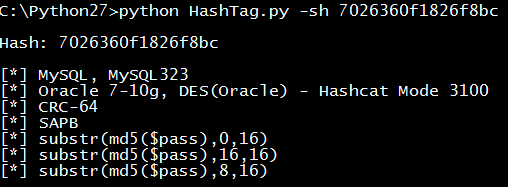
HashTag.py -sh 3b1015ccf38fc2a32c18674c166fa447

Parsing and identifying hashes from a file (-f):

HashTag.py -f testdir\street-hashes.10.txt -hc
Here is the output file. Each identified hash outputs the hash, char length, hashcat modes (if found) , and possible hash types:
Using the -hc/--hashcat argument we get a file for each hash type if a corresponding hashcat mode is found. This makes the process of cracking hashes with hashcat much easier as you immediately have the mode and input file of hashes:
Output from a file with many different hash types (the filenames are hashcat modes and inside are all hashes of that type):

Traversing Directories and Identifying Hashes (-d):

HashTag.py -d ./testdir -hc
The output consists of three main things:
  • Folders containing copies of potentially password protected files. This makes it easy to group files based on extension and attempt to crack them.
  • HashTag default files - A listing of all hashes, password protected files the tool doesn’t recognize, and hashes the tool can’t identify (good for tool debugging).
  • Files for each identified hash type - each file contains a list of hashes. The -hc/--hashcat argument will append the hashcat mode (if found) to the filename.
 

List of hash functions

Cyclic redundancy checks

Name Length Type
BSD checksum 16 bits CRC
checksum 32 bits CRC
crc16 16 bits CRC
crc32 32 bits CRC
crc32 mpeg2 32 bits CRC
crc64 64 bits CRC
SYSV checksum 16 bits CRC
Adler-32 is often classified as a CRC, but it uses a different algorithm.

Checksums

Name Length Type
sum (Unix) 16 or 32 bits sum
sum8 8 bits sum
sum16 16 bits sum
sum24 24 bits sum
sum32 32 bits sum
fletcher-4 4 bits sum
fletcher-8 8 bits sum
fletcher-16 16 bits sum
fletcher-32 32 bits sum
Adler-32 32 bits sum
xor8 8 bits sum
Luhn algorithm 4 bits sum
Verhoeff algorithm 4 bits sum
Damm algorithm 1 decimal digit Quasigroup operation

Non-cryptographic hash functions

Name Length Type
Pearson hashing 8 bits xor/table
Buzhash variable xor/table
Fowler–Noll–Vo hash function
(FNV Hash)
32, 64, 128, 256,
512, or 1024 bits
xor/product or
product/xor
Zobrist hashing variable xor
Jenkins hash function 32 or 64 bits xor/addition
Java hashCode() 32 bits
Bernstein hash[1] 32 bits
elf64 64 bits hash
MurmurHash 32, 64, or 128 bits product/rotation
SpookyHash 32, 64 or 128 bits see Jenkins hash function
CityHash 64, 128, or 256 bits
xxHash 32 bits

Cryptographic hash functions

Name Length Type
BLAKE-256 256 bits HAIFA structure
BLAKE-512 512 bits HAIFA structure
ECOH 224 to 512 bits hash
FSB 160 to 512 bits hash
GOST 256 bits hash
Grøstl 256 to 512 bits hash
HAS-160 160 bits hash
HAVAL 128 to 256 bits hash
JH 512 bits hash
MD2 128 bits hash
MD4 128 bits hash
MD5 128 bits Merkle-Damgård construction
MD6 512 bits Merkle tree NLFSR
RadioGatún Up to 1216 bits hash
RIPEMD-64 64 bits hash
RIPEMD-160 160 bits hash
RIPEMD-320 320 bits hash
RTR0 160 bits Drawers construction
SHA-1 160 bits Merkle-Damgård construction
SHA-224 224 bits Merkle-Damgård construction
SHA-256 256 bits Merkle-Damgård construction
SHA-384 384 bits Merkle-Damgård construction
SHA-512 512 bits Merkle-Damgård construction
SHA-3 (originally known as Keccak) arbitrary Sponge function
Skein arbitrary Unique Block Iteration
SipHash 64 bits non-collision-resistant PRF
Snefru 128 or 256 bits hash
Spectral Hash 512 bits Wide Pipe Merkle-Damgård construction
SWIFFT 512 bits hash
Tiger 192 bits Merkle-Damgård construction
Whirlpool 512 bits hash

Wednesday, 5 March 2014

Android cheet codes

1. Phone Information, Usage and Battery – *#*#4636#*#*
2. IMEI Number – *#06#
3. Enter Service Menu On Newer Phones – *#0*#
4. Detailed Camera Information –*#*#34971539#*#*
5. Backup All Media Files –*#*#273282*255*663282*#*#*
6. Wireless LAN Test –*#*#232339#*#*
7. Enable Test Mode for Service –*#*#197328640#*#*
8. Back-light Test – *#*#0842#*#*
9. Test the Touchscreen –*#*#2664#*#*
10. Vibration Test –*#*#0842#*#*
11. FTA Software Version –*#*#1111#*#*
12. Complete Software and Hardware Info –*#12580*369#
13. Diagnostic Configuration –*#9090#
14. USB Logging Control –*#872564#
15. System Dump Mode –*#9900#
16. HSDPA/HSUPA Control Menu –*#301279#
17. View Phone Lock Status –*#7465625#
18. Reset the Data Partition to Factory State – *#*#7780#*#*

Thursday, 27 February 2014

How to track IP address of anyone using email?

How to track IP address of anyone using email?

Today i am going to explain you advanced method. By using method you can get the IP address,location, timing of victim. 

How to track IP address?

step 1: Know what is your victim email id.

For eg: victimid[@]gmail.com

step 2: Register an account here: http://www.readnotify.com/

step 3: Send mail to victim using your readnotify.com mail account. Before sending mail append ".readnotify.com" at end of victim mail ID.

For eg: victimid[@]gmail.com.readnotify.com

step 4:If victim opens the mail, his info will be tracked(IP address) and mailed to your account.

Saturday, 8 February 2014

Top ten Linux distribution for Hackers

1. BackTrack 5r3: This is one of the most loved and best known Linux-based hacking distributions. Based on Canonical’s Ubuntu operating system, Backtrack’s logo says, “The quieter you become, the more you are able to hear.” With version 5, the GNOME desktop environment was added along with the usual KDE desktop environment.

2. Nodezero: This is another Ubuntu-based hacking, which is used for penetration testing. Every time you get a patch for bugs in the Ubuntu OS, Nodezero also gets updated. 

3. BackBox Linux: This is yet another Ubuntu-based distro being used for hacking. According to the developers, the OS has been designed to create a penetration testing distro that is fast and easy to use. It also gets update with new ethical hacking tools regularly using repositories.

4. Blackbuntu: Ubuntu itself may not be a hacking distro, but there are plenty that are based on it. This distribution comes with categories such as Network Mapping, Information Gathering, Penetration, Vulnerability Identification, Privilege Escalation, Radio Network Analysis, VoIP analysis and more.

5. Samurai Web Testing Framework: This distro lays focus on attacking websites using the best free and open source tools for hacking and attacking. The developers have incorporated four steps into the distribution, including, reconnaissance, mapping, discovery and exploitation.

6. Knoppix STD: From Ubuntu to Debian, Knoppix STD is a Debian based hacking distribution that runs the GNOME, KDE, LXDE and Openbox desktop environments. It has been around for quite a long time now and was amongst the first live distros.

7. Pentoo: This is a live CD that is meant for security testing and is based on Gentoo. It comes with a number of customised tools and kernel from the company. These include a Backported WiFi stack, XFCE4 etc.

8. Weakerthan: This distribution uses the Flufbox desktop environment and is best suited for WiFi hacking because of its many Wireless tools. It is a Debian Squeeze-based distribution that comes with tools for WiFi attacks, Cisco exploitation, SQL Hacking, Web Hacking, Bluetooth and others.

9. Matriux Krypton: After Weakerth4n, this is perhaps the first distribution that is directly based on the Debian OS. It contains an arsenal of 300 security tools and makes for a good choice for ethical hacking, penetration testing, security testing, system and network administration, cyber forensics investigations etc.

10. DEFT: This OS is based on the Linux Kernel 3 along with the Digital Advanced Response Toolkit. It uses WINE in order to run Windows tools Linux and predominantly run with the LXDE desktop environment.

Saturday, 25 January 2014

How to Create a Torrent

If you've ever wondered how to create a torrent, you've come to the right place. This article will explain how to create a torrent and use it to upload whatever you want to people all over the world! If you do not know what BitTorrent is or how your client is used,
1.) Investigate your torrent client. Most up-to-date clients can make torrents (only a minority may not be able to). For a free client that can create torrents try µTorrent for Windows and Mac, Transmission for Mac, Deluge for Linux or JSTorrent for Chrome OS. (Note: JSTorrent cannot make torrents. It is just a torrent client for Chromebooks.)


[Image: create+torrent.png]


2.) Select the option to make a new torrent file. This is usually located under the File menu and named "Create New Torrent" or words to that effect. If it is not in this location try looking under other menus or the toolbars. If you are still uncertain, check the official website of your client for more details. Sometimes dragging the file/folder into the client also works.


[Image: Screenshot_1.png]


3.) Select the files you wish to be in the torrent. If you will have several files consider arranging them all first in a folder, so you can simply select that folder to use as the torrent contents. The name of your torrent file will usually be the name of the file or folder in it. You can easily rename the file afterwards.


[Image: Screenshot_2.png]


4.) Enter a tracker. A tracker controls the transfer of data for your torrent. A tracker looks similar to an ordinary URL. A list of working public bittorrent trackers is available here. If you want to index your torrent on a torrent downloads website then you should use the tracker owned by that website, as not all indexing sites will allow external trackers. If you are using a private tracker (you probably aren't), then be sure to tick the box to mark it as private. Do not tick this box otherwise.


[Image: Screenshot_3.png]


5.) Add any additional information. You can add a comment for the torrent if you wish. The piece size should be left at the automatic setting unless you know what you're doing. Once you have filled in all the required areas create your torrent. You may be asked where to save and what to call the .torrent file, or you may have been asked beforehand.


6.) Now that you have your torrent file open it ready for seeding. Some clients have a seed mode specifically for this. If you do not seed your torrent it will be useless because nobody can download your files.


7.) Share your torrent. If you are making the torrent so you can send a friend a file, just send them the .torrent file. If you want it open to the public to download you are best listing it on a torrent download website. Once on such a site find the link to add or upload a new torrent and fill in the required information. You will probably be required to register if you have not already.
Once people start downloading the torrent from this site it will gather more and more seeders. If you wish you can stop seeding once the torrent is "stable", or continue to seed.


[Image: pbCMqeC.png]

Monday, 20 January 2014

How to make folowers on facebook

Hello frnds...

Today, I will be sharing the method to make Unlimited Facebook Followers in a few Days....


Lets get started, all you need a follower list.....

You can create lists from here...

https://www.facebook.com/bookmarks/interests 


Just create a facebook interest list with
 attractive name..  Just like i made this...

'--->Ultimate Followers<--- Just Click Follow'
https://www.facebook.com/lists/1420283044850755


Like the above you can create many Lists...


To get started You need some followers on the list so you need to mass post on fb groups , pages , timeline, etc...


That every one follows the list after you reach 50+ followers on the list the game starts...

Now you need some Exchange groups For the list Exchange...


Some Exchange Groups i know


, Join all these Groups you will find more, start with them its good for beginners....

https://facebook.com/groups/1375010219379819


https://facebook.com/groups/212402722241872

https://facebook.com/groups/328426787285067
 

https://facebook.com/groups/629094953787190

https://facebook.com/groups/530056310387486

https://facebook.com/groups/178733135622121
 

https://facebook.com/groups/147920605278395

Post in the Exchange Groups....

Example: 
"Add me To your list, i will add You to my list "
https://www.facebook.com/lists/1420283044850755


Just keep posting Recently and comment on all active post on the exchange groups...

Once you get Added to others list you will be followed by the Followers on their list...


If you are in a list with 1K followers the 1K will be added to your followers count in next 24 hrs....

Sunday, 19 January 2014

How to Dual Booting in Dell Or new lappies

Many new computers are shipping with the option to boot Unified Extensible Firmware Interface (UEFI) instead of standard BIOS.  In today’s blog I walkthrough how I installed Windows 7 SP1 X64 Enterprise on a Dell Latitude E6410 laptop that supports UEFI. 
The screenshots are specific to a Dell E6410 laptop but you should similar type screens on other UEFI based machines.  For more information contact the manufacturer of the computer. 
1.       Upgrade to latest BIOS.  Before you install in UEFI mode you should generally check with the vendor to make sure the BIOS is up to date. 
2.       Configure the computer for UEFI.  Most UEFI based computers will also support legacy BIOS boot.  This is configured in the BIOS.  The following shows the computer is set for Legacy Boot and the boot options available with Legacy Boot
clip_image002
Figure 1.  Legacy Boot Options

clip_image004
Figure 2.  Configure BIOS for UEFI or Legacy
3.       Insert Windows 7 SP1 X64 DVD.  Note:  One of the common issues we see is that users try to install X86 version with UEFI enabled in the bios.  X86 does not support UEFI so you would have to configure the machine for Legacy boot to install X86 versions of Windows.  If you do try to install X86 version setup will run but on the 1st reboot you will get BIOS error similar to “No bootable devices –Strike F1 to retry boot, F2 for setup utility.  Press F5 to run onboard diagnostics”
4.       Press F12 to choose to boot from the DVD and choose the UEFI boot option for the DVD
Note the UEFI option for the DVD under UEFI boot  
clip_image006
Figure 3.  UEFI boot option for Windows 7 DVD
5.       Follow prompts to install Windows 7 just like any other install
Differences between UEFI vs. Legacy BIOS boot install
When complete you will a couple of differences compared to a legacy BIOS boot install. 
You have the following default disk configuration:  
·         100mb Fat32 EFI System Partition
·         128mb Microsoft Reserved Partition(will not appear in Disk Management but you can see it in the command line Diskpart tool)
clip_image008
Figure 4.  Disk Management on UEFI computer

In the properties of the disk you also see that we setup a GPT partition table instead of MBR:
clip_image010
Figure 5.  GPT Partition Table
If you run Bcdedit /enum you will see the following entries in the BCD store. 
Windows Boot Manager
--------------------
identifier                   {bootmgr}
device                        partition=\Device\HarddiskVolume1
path                            \EFI\Microsoft\Boot\bootmgfw.efi
description               Windows Boot Manager
locale                         en-US
inherit                        {globalsettings}
default                       {current}
resumeobject                                  {c79ed24a-6d11-11e0-a52b-93ef911fd7fa}
displayorder            {current}
toolsdisplayorder       {memdiag}
timeout                     30

Windows Boot Loader
-------------------
identifier                   {current}
device                        partition=C:
path                            \Windows\system32\winload.efi
description               Windows 7
locale                         en-US
inherit                        {bootloadersettings}
recoverysequence      {c79ed24c-6d11-11e0-a52b-93ef911fd7fa}
recoveryenabled         Yes
osdevice                    partition=C:
systemroot              \Windows
resumeobject                                  {c79ed24a-6d11-11e0-a52b-93ef911fd7fa}
nx                                OptIn
On this particular Dell mode you can also see in the BIOS that Windows 7 setup added a new boot option
clip_image012
Figure 6.  Windows Boot Manager entry in BIOS
Boot Option Name:  Windows boot Manager
File System List:  HD(1,GPT, 05F6D08B-563C-480D-AF3CB9FD1E973A33)
File Name:  \EFI\Microsoft\Boot\bootmgfw.efi
If you are doing a large deployment to many machines not all deployment tools support UEFI yet so check with the vendor of the deployment tool to see if they support UEFI based computers. 

Hope this helps with your installs.

Sunday, 5 January 2014

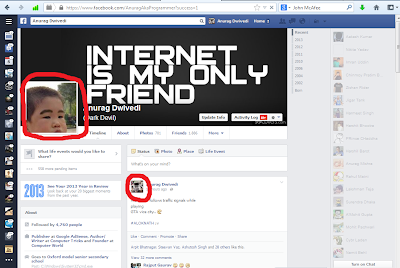
How To Use Two Different Profile Picture in Facebook


Hai Guys Today i am going to share a new trick which was founded yesterday by Khalil (Security Researcher) From This Trick You Can Use Two Different Profile Picture in Facebook :D ! 


1. Open Your Profile Picture Album and then that picture you want to use as anotherprofile picture

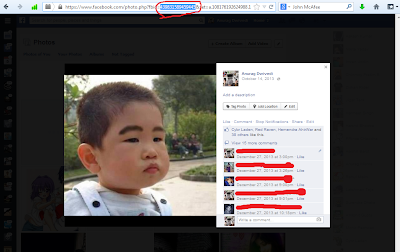
2. Open that picture then copy the FB ID of that Picture . See Below :


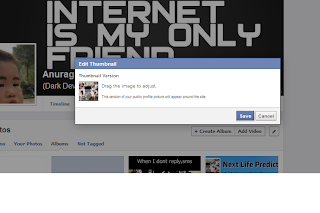
3. Now Go To Your Timeline and hover your mouse to your current profile picture and right click on it then select edit thumbnail . 

4. Now A popup box will open right click on your current profile pic and select inspect element 

                               
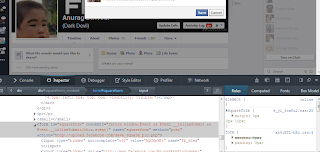
5. Now Scroll Down Until You Find " <form action=”https://upload.facebook.com/save_square_pic.php

Then Double Click on it to expand the Code


6. Now Replace the image code with the image code which you have copied earlier 


7. Now Click AnyWhere and exit the inspect element and click on save. 

Done Now CHeck Your Profile : D !